
.
Do you share the IEP goals and accommodations with general education teachers? Here is a PDF form, Special Education IEP Snapshot, that you can use to help you inform the regular education teacher(s) of those students in the regular education classroom who are Multilingual Learners and have IEP’s and may need adaptations.
.
I also built the AI generator companion below for you to use in case you want to generate your own. The purpose of “AI Special Education & Multilingual Learner Snapshot” is to help classroom teachers quickly understand how to support a student instructionally, not to reproduce or summarize confidential legal documents. This tool is designed so that teachers enter only the instructional information they are authorized to share, avoiding sensitive personally identifiable information or unnecessary disability details.
.
.
AI SPED Inclusion Accommodations Weekly Monitoring Generator
Monitor instructional access. Strengthen inclusive practice.
Please complete all required fields before generating:
Synthesizing Instructional Access Observations…
Applying UDL & Strengths-Based Analytics
No Weekly Report Generated Yet
Fill out the instructional context and accommodations in the left panel, then click “Generate Weekly Monitoring Report”.
Student Monitoring Summary
Setting: General Education | Dates: — to —
Teacher: —
Case Mgr: —
School/Grade: —
1. Weekly Instructional Snapshot
Lesson Focus: —
Learning Objective: —
Student Assets & Strengths: —
Instructional Access Priorities: —
2. Accommodation Implementation Summary
| Accommodation | Access Purpose | Implementation Rating | Evidence Observed | Suggested Next Step |
|---|
3. Instructional Reflection
4. Evidence of Student Access
5. Student Independence Tracker
Teacher Directed
Shared Responsibility
Increasing Independence
Independent Use
6. Small Group Instruction Recommendations
8. Teacher Reflective Prompts
9. Family Communication Summary
What we focused on this week: —
How we supported learning in class: —
Positive success observed: —
Suggested Home Partner Activity:
—
10. Human-Centered AI Teaching Continuum
1. Expert Teacher
Selected supports, observed live instruction, and evaluated evidence.
2. AI Partner
Synthesized qualitative observations into structured records.
3. Inclusive Design
Preserved grade-level academic rigor through UDL access.
4. Evidence & Reflect
Weekly observational insights guide next week’s adaptations.
5. Student Independence
Empowers self-advocacy and gradual release of supports.
11. Weekly Action Plan (Next Instructional Cycle)
12. Teacher & Case Manager Signature Log
Note: This document is an instructional access progress monitoring tool designed to guide classroom adaptation and Universal Design for Learning. It is not an official legal compliance form or IEP modification document.
.
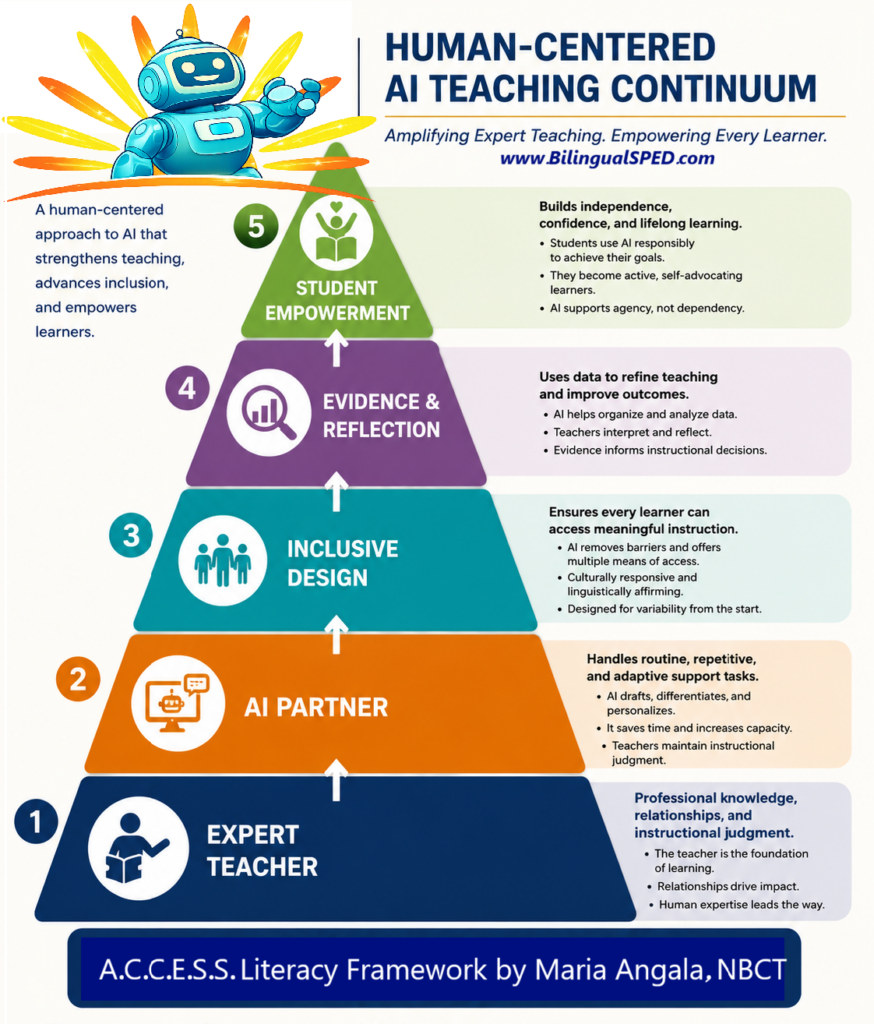
This aligns well with our Human-Centered AI Teaching Continuum:
.
- Expert Teacher: Determines which instructional supports are appropriate to communicate.
- AI Partner: Organizes information into a concise, teacher-friendly reference.
- Inclusive Design: Highlights accommodations, language supports, and strengths.
- Evidence & Reflection: Encourages monitoring effectiveness.
- Student Empowerment: Keeps the focus on student strengths, access, and independence.
.
You are the calm in their storm. Keep showing up, keep tracking the data, and keep respecting their dignity. You’ve got this.
.
Join our FUNSHINE Community to receive our latest free A.C.C.E.S.S. AI tools and other updates:
.