
After 8 years of drowning in IEP paperwork, I discovered AI prompts that cut my documentation time by 60% while actually improving quality. These 10 prompts handle everything from present levels to accommodation suggestions, transforming case management from overwhelming to manageable. This isn’t about replacing teacher judgment—it’s about reclaiming time for what actually matters: working with students.
Let me tell you about the moment I almost quit being a case manager.
It was 10 PM on a Tuesday. I’d been writing IEPs since 3:30 that afternoon. My own kids were already asleep. I had seven more IEPs due that week, and I was staring at a blank screen trying to figure out how to describe the present levels for a student with autism who’d just joined my caseload.
I knew this kid. I’d worked with him for three weeks. But translating what I understood about his strengths and needs into formal IEP language that was both compliant and actually useful? My brain was fried. The words weren’t coming. And I had six more documents to write after this one.
That’s when I started experimenting with AI as a writing assistant—not to replace my professional judgment, but to help me articulate what I already knew in ways that were clear, compliant, and actually helpful for the team implementing the IEP.
Two years later, I’ve refined this process into a system that’s completely changed my relationship with IEP paperwork. I’m sharing the exact prompts I use because I wish someone had shared this with me years ago when I was drowning in documentation and seriously questioning whether I could sustain this work.
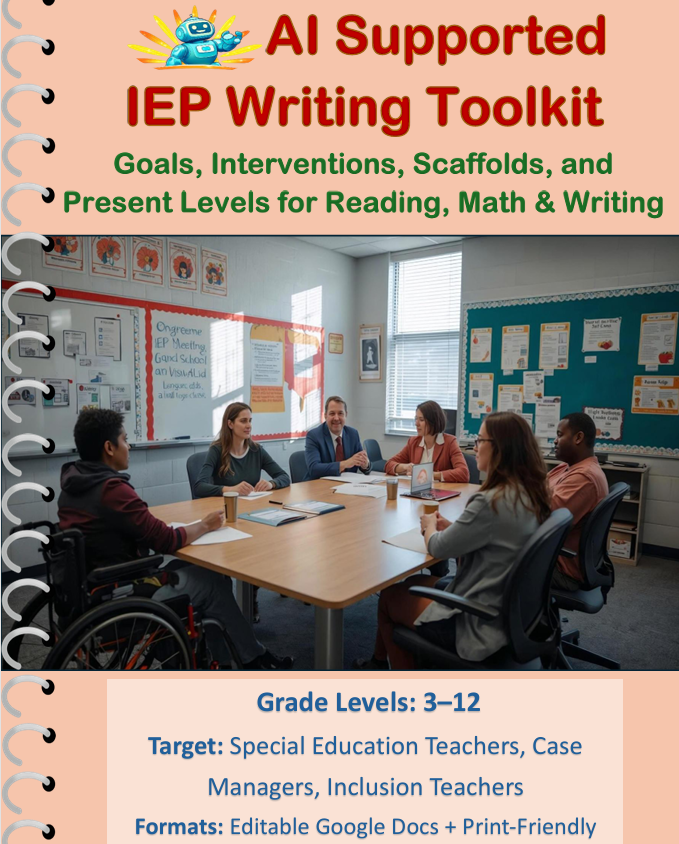
And if you want the ready-made version of what I’m about to describe—complete templates, example outputs, and step-by-step guidance—I created an AI-Supported IEP Writing Toolkit specifically for this purpose. But let me walk you through how this actually works first.
Why AI for IEP Writing Isn’t What You Think (and Why It’s Ethical)
Before I share the prompts, I need to address the elephant in the room: isn’t using AI to write IEPs somehow wrong or impersonal?
Here’s the thing—AI isn’t writing the IEP. I am.
AI is functioning as a translation tool, helping me convert my professional observations and data into clearly articulated, legally compliant language. I’m still doing all the thinking, all the analysis, all the decision-making. AI is just helping me get it on paper faster and more clearly.
According to research from the National Center for Learning Disabilities, special education teachers spend an average of 7 hours per week on paperwork, with case managers often exceeding 10-15 hours weekly during IEP season (source). That’s time we’re not spending with students, not collaborating with families, not planning instruction.
The Council for Exceptional Children acknowledges that administrative burden is a primary factor in special education teacher burnout and turnover (source). If AI tools can reduce that burden while maintaining or improving quality, we have an ethical obligation to explore them.
But—and this is critical—I never copy-paste AI output directly into an IEP. Every single sentence gets reviewed, edited, personalized, and verified against my actual data and observations. AI is my drafting assistant, not my substitute.
How I Use AI in My IEP Workflow (The Actual Process)
Here’s my actual workflow, from start to finish:
- Gather data (assessments, work samples, observations, input from teachers and families)
- Analyze and make professional determinations (What are the needs? What are appropriate goals? What supports are required?)
- Use AI prompts to generate draft language based on my determinations
- Heavily edit and personalize the AI output
- Cross-reference with data to ensure accuracy
- Review for compliance and appropriateness
- Share with team for input and refinement
Notice that AI comes in at step 3, after I’ve done all the professional thinking. It’s helping me articulate, not helping me decide.
Now let’s get to the actual prompts.
Prompt 1: Converting Raw Data Into Present Levels

The Challenge: You’ve got assessment scores, teacher reports, observation notes, and work samples. But translating all that into a cohesive present levels statement that’s both compliant and readable? That’s where most of us get stuck.
My Prompt:
I need help writing a present levels statement for an IEP. Here is the data I have:

[Paste your organized data: assessment scores, observations, work samples description, teacher input]

Please draft a present levels statement that:
- Starts with strengths
- Describes current performance in specific, measurable terms
- Explains how the disability affects involvement and progress in general education
- Is written in clear, jargon-free language
- Is approximately 150-200 words
- Focuses on [specific area: reading, math, behavior, etc.]

Use factual, objective language. Do not make assumptions beyond the data provided.
Why This Works:
The prompt gives AI clear parameters while keeping me in control of the information. I’m providing all the actual data and professional interpretation—AI is just helping me organize and articulate it.
In my experience, this cuts the time to write present levels from 30-45 minutes per area to about 10-15 minutes, because I’m spending time editing and refining rather than staring at a blank screen.
Real Example:
I had a student with dyslexia and ADHD. I gave AI the reading assessment data, classroom observations about attention and processing, and work samples showing decoding errors. The AI draft gave me a solid foundation that I then personalized with specific examples from our classroom (“During independent reading, Marcus demonstrates strong comprehension when using audiobooks but struggles with grade-level text decoding, particularly with multisyllabic words”).
The AI-Supported IEP Writing Toolkit includes variations of this prompt for different disability categories and grade levels, which saves even more time since you’re not starting from scratch each time.
QUICK WIN: Before using AI prompts, spend 5 minutes organizing your data into categories (academic performance, social-emotional functioning, behavioral observations, assessment results). This makes prompting much more efficient and results in better outputs.
Prompt 2: Drafting SMART Goals Based on Present Levels
The Challenge: Goals need to be specific, measurable, achievable, relevant, and time-bound—while also being ambitious enough to represent meaningful progress.
My Prompt:
Based on this present levels information:

[Paste the present levels you've written]

Please draft 2-3 IEP goals that are:
- Specific and measurable
- Aligned to the identified needs
- Appropriate for a [grade level] student with [disability]
- Achievable within one year with specialized instruction
- Written in measurable terms (e.g., "will improve from X to Y" or "will demonstrate Z with 80% accuracy across 4/5 trials")

Include the baseline, target, measurement method, and conditions for each goal.
Why This Works:
AI is actually pretty good at goal structure—it understands the SMART framework and can generate well-formatted goals. But it needs your professional judgment about what’s actually appropriate and achievable for your specific student.
I usually get 3-4 goal options from AI, then I select, combine, and modify based on what I know about the student’s learning trajectory and what’s realistically achievable.
What I Always Modify:
- The baseline data (I verify this against actual assessments)
- The target (AI often suggests targets that are either too conservative or too ambitious—I adjust based on growth patterns I’ve observed)
- The conditions (AI might miss critical conditions like “with visual supports” or “in a small group setting” that I know my student needs)
Prompt 3: Generating Accommodation Suggestions
The Challenge: We often default to the same accommodations we’ve always used, potentially missing supports that could be more effective for a particular student.
My Prompt:
I'm writing accommodations for a student with [specific disability/diagnoses]. The student's primary challenges are:

[List 3-5 specific challenges]

The student's strengths include:

[List 2-3 strengths]

Please suggest 10-15 evidence-based accommodations organized by category (presentation, response, setting, timing/scheduling) that address these specific needs. Include both academic and testing accommodations. Consider accommodations that support sensory processing needs, executive function, language access for multilingual learners, and social-emotional regulation.
Why This Works:
AI has access to a vast database of research-based accommodations. It can suggest options I might not have considered, particularly for students with complex or co-occurring disabilities.
However—I’m making the final decisions based on what’s feasible in our actual setting and what I know about the student’s response to different supports.
Real Example:
For a student with autism who was struggling with sensory overload during assessments, AI suggested several accommodations I hadn’t thought of: allowing student to wear noise-canceling headphones during independent work, providing a “calm down” corner with sensory tools, using a visual timer for transitions, offering fidget tools during instruction.
I implemented three of these (we couldn’t do the separate testing room due to space constraints) and saw immediate improvement in the student’s ability to engage with assessments.
The toolkit I created includes accommodation banks organized by disability category and need area, which makes this process even faster—you’re not starting from zero each time.
Prompt 4: Writing Behavior Intervention Plans (BIPs)
The Challenge: BIPs require specific language around function of behavior, replacement behaviors, and intervention strategies. Getting this right is critical for both compliance and actually helping the student.
My Prompt:
I need help drafting sections of a Behavior Intervention Plan. Here is the information I have:

Target Behavior: [Describe observable, measurable behavior]
Function of Behavior: [Based on FBA: escape, attention, sensory, access to tangible]
Baseline Data: [Frequency/duration/intensity from data collection]
Student Strengths: [List strengths that can be built upon]

Please draft:
1. A clear operational definition of the target behavior
2. Three prevention strategies that address the function
3. Two replacement behaviors we can teach
4. Three reinforcement strategies for the replacement behavior
5. Two de-escalation strategies if the target behavior occurs

Use positive, strength-based language throughout. Focus on teaching skills rather than just reducing problem behavior.
Why This Works:
BIPs are highly technical documents, and the language matters a lot. AI helps me make sure I’m using function-based language consistently and that my strategies logically connect to the identified function.
But I always cross-reference with my FBA data and often consult with our behavior specialist before finalizing anything.
QUICK WIN: When using AI for BIPs, always verify that recommended strategies match the function of behavior. AI sometimes suggests interventions that work for one function but not another—your professional judgment is critical here.
Prompt 5: Creating Social Stories and Visual Supports

The Challenge: Social stories need to be individualized, developmentally appropriate, and culturally responsive. Creating these from scratch is time-consuming, especially when you need versions in multiple languages for multilingual families.
My Prompt:
Please create a social story for a [age] year old student with [disability] about [specific situation/skill].

The student's reading level is approximately [grade level].

The story should:
- Be 6-8 sentences long
- Use first-person perspective ("I" statements)
- Include positive, concrete descriptions of expected behavior
- End with a reassuring statement
- Use simple, clear language appropriate for [reading level]

After creating the English version, please provide a Spanish translation. [Or other language as needed]
Why This Works:
Social stories follow a specific formula, which AI handles well. And having immediate translations for families who speak other languages is incredibly helpful.
However, I always review for cultural appropriateness and adjust language to match how my student actually speaks. AI tends toward formal language; I make it more conversational and natural.
Real Example:
I needed a social story about wearing a mask during fire drills for a student with sensory sensitivities and autism. AI created a clear, simple story in about 30 seconds. I edited it slightly to include the specific sensory strategies we’d been using (“I can hold my soft fidget ball while wearing my mask”), then shared both English and Spanish versions with the family.
If you want ready-made social story templates for common situations—along with editable versions you can customize—the AI IEP Writing Toolkit includes an entire section on this, with examples for different age groups and disabilities.
Prompt 6: Writing Progress Reports That Parents Actually Understand
The Challenge: Progress reports need to be data-based and specific while also being comprehensible to families who aren’t educators.
My Prompt:
I need to write a progress report for this IEP goal:

[Paste the actual goal]

Here is the student's current performance data:

[Provide specific data: percentages, work samples, observation notes]

Please draft a progress report that:
- States whether the student is making sufficient progress toward the goal
- Provides specific evidence and examples
- Explains progress in parent-friendly language (avoid jargon)
- Is encouraging but honest
- Is approximately 75-100 words
- Suggests next steps or areas of focus

Include a Spanish translation after the English version. [Or other language]
Why This Works:
AI helps me translate data into narrative form and catches when I’m using too much educational jargon. The translation feature is huge for communicating with multilingual families.
But I always add personal observations and specific examples that only I would know (“Maria was so proud when she read an entire page independently last week!”).
Prompt 7: Drafting Transition Plans for Secondary Students
The Challenge: Transition planning requires thinking across multiple domains (employment, education, independent living) and needs to be truly individualized to student interests and needs.
My Prompt:
I'm writing a transition plan for a [age] year old student with [disability].

Student's interests: [List 2-3 specific interests]
Student's strengths: [List strengths]
Student's post-secondary goals: [Education, employment, independent living goals]
Current skill levels: [Brief description in each transition domain]

Please suggest:
1. Three measurable transition goals (one for each domain: education, employment, independent living)
2. Five transition activities or services the student should participate in this year
3. Three community resources or agencies we should connect with
4. Skills the student needs to develop to achieve their post-secondary goals

Consider accommodations and supports needed for successful transition, including sensory considerations and language access needs if applicable.
Why This Works:
Transition planning requires thinking broadly about resources and possibilities. AI can suggest activities, services, and connections I might not have thought of.
But I’m the one who knows what’s actually available in our community and what’s realistic given our student’s specific profile. AI provides options; I make informed selections.
Prompt 8: Explaining Evaluation Results to Families
The Challenge: Assessment reports are full of scores, percentiles, and technical language. Families need explanations they can actually understand.
My Prompt:
I need to explain these assessment results to a family:

[Paste relevant scores and findings]

Please create a parent-friendly explanation that:
- Explains what each score means in everyday language
- Avoids technical jargon or defines necessary terms clearly
- Focuses on what this means for the student's learning
- Maintains a strength-based, hopeful tone
- Is approximately 150-200 words

After the English version, provide a Spanish translation. [Or other language]
Why This Works:
AI is excellent at translating technical language into plain language. This helps me prepare for IEP meetings and create documents families can reference later.
However, I always supplement AI’s explanation with concrete examples from our classroom and answer family questions in real-time—that human connection is irreplaceable.
According to the U.S. Department of Education, meaningful family engagement in special education significantly improves student outcomes, but it requires clear communication that builds understanding and partnership (source). These AI-supported explanations are one tool for making communication more accessible.
Prompt 9: Generating Data Collection Sheets
The Challenge: Progress monitoring requires systematic data collection, but creating tracking sheets for every goal is tedious and time-consuming.
My Prompt:
I need a data collection sheet for this IEP goal:

[Paste the specific goal]

Please create a simple data tracking table that includes:
- Columns for: Date, Activity/Task, Performance (percentage or level), Supports Provided, Notes
- 20-25 rows for entries
- Space at the top for: Student Name, Goal, Baseline, Target
- Simple, clear formatting

Also provide brief instructions for how to use the sheet.
Why This Works:
AI can generate clean, organized tables quickly. While I can’t directly copy-paste formatted tables into my IEP system, I use the AI output as a template to recreate in Excel or Google Sheets.
This saves me from having to design data sheets from scratch for every single goal—I just modify the AI template as needed.
Pro Tip: I keep a folder of these AI-generated templates organized by goal type (reading fluency, math computation, behavior frequency, etc.). When I need a data sheet, I can quickly access and adapt an existing template rather than starting over.
Prompt 10: Creating Parent Communication Drafts

The Challenge: Regular communication with families is critical, but crafting emails and updates that are informative, positive, and clear takes time I often don’t have.
My Prompt:
I need to write an email to a parent about [situation: progress, concern, upcoming meeting, etc.].

Key information to include:
- [List 2-4 key points]

Tone should be: [positive, collaborative, solution-focused, etc.]

Please draft an email that:
- Opens with something positive about the student
- Clearly explains the situation
- Is respectful and collaborative
- Includes a specific next step or question
- Is approximately 100-150 words
- Maintains professional boundaries

Provide both English and Spanish versions.
Why This Works:
AI helps me maintain a positive, collaborative tone even when I’m stressed or dealing with a difficult situation. It catches when my language might come across as defensive or blaming.
But I always add personal touches—referencing specific conversations I’ve had with the family, mentioning the student by name, including details that show I really know their child.
The Research Institute on Secondary Education Reform found that when teachers maintain regular, positive communication with families of students with disabilities, students demonstrate better academic outcomes and improved behavior (source). These AI-drafted communications are one strategy for making that regular contact more sustainable.
In-Content CTA: If you’re thinking “This sounds great but I don’t want to write all these prompts from scratch,” I totally get it. That’s exactly why I created the AI-Supported IEP Writing Toolkit—it includes all 10 of these prompts plus variations for different grade levels, disability categories, and situations. You get copy-paste ready prompts, example outputs, editing checklists, and guidance on ethical AI use in special education. Basically everything I wish I’d had when I started using AI for IEP writing.
The Ethical Guidelines I Follow (Non-Negotiable Rules)
Using AI for IEP writing comes with significant ethical responsibilities. Here are my non-negotiable rules:
1. Never input identifying information into AI I never use student names, birthdates, school names, or other identifiable information. I use placeholders like “Student” or “8th grade student with learning disability.”
2. Always verify against actual data Every claim in my IEP must be backed by real data I’ve collected. AI helps me articulate, but I verify every statement.
3. Never use AI for eligibility decisions AI doesn’t determine whether a student qualifies for services—that’s a professional decision made by qualified team members based on comprehensive evaluation.
4. Maintain student privacy I use AI platforms with strong privacy policies (like Claude.ai or ChatGPT with business accounts) and never use free versions that might use inputs for training.
5. Disclose AI use appropriately I let my administrator know I use AI as a drafting tool, and I’m transparent that AI-generated content is always heavily edited and personalized.
6. Prioritize quality over speed The goal isn’t to rush through IEPs—it’s to use time more efficiently so I can focus on quality and individualization.
What AI Can’t Do (And Why I’m Still Essential)
Let me be clear about AI’s limitations in special education:
AI can’t:
- Know your student as an individual person
- Understand your school’s specific culture and resources
- Make professional judgments about disability impact
- Interpret assessment data in context
- Build relationships with families
- Understand the nuances of your student’s learning patterns
- Navigate the complex human elements of IEP team dynamics
- Ensure cultural responsiveness and equity
I can do all of those things. AI is my assistant, not my replacement.
The most critical aspects of special education—understanding students deeply, building trust with families, making nuanced instructional decisions, advocating for student needs—these remain entirely human work. AI just helps me spend less time on paperwork so I can spend more time on the parts that actually require my expertise and heart.
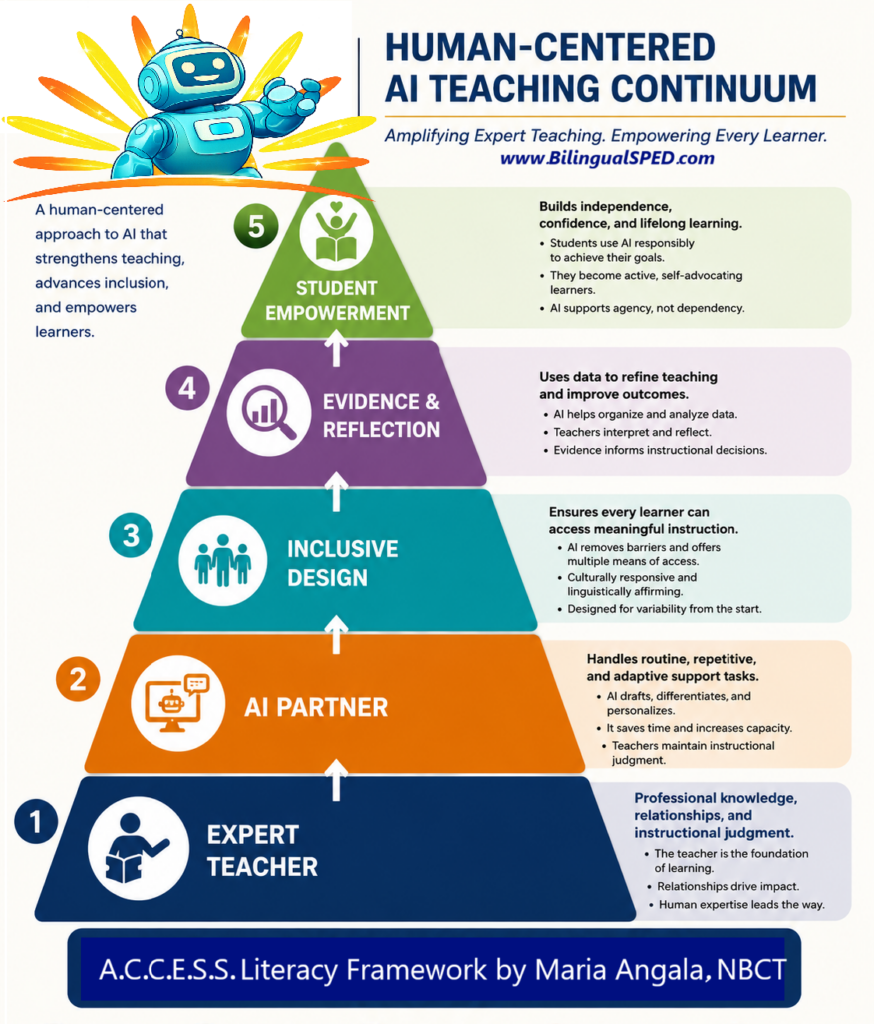
I developed a Human-Centered AI Teaching Continuum embedded within the A.C.C.E.S.S. Literacy Framework to guide educators in using AI ethically and effectively to amplify expert teaching for multilingual learners and students with disabilities.
Troubleshooting Common Issues
Problem: AI output is too generic or doesn’t fit my student
Solution: Provide more specific information in your prompt. Instead of “student struggles with reading,” say “student decodes at 2nd grade level but comprehends at 4th grade level when listening; primary difficulty is with fluency and multisyllabic word decoding.”
Problem: AI uses language that doesn’t match IEP compliance requirements in my state
Solution: Add to your prompt: “Use language consistent with [your state] IEP requirements” and include specific requirements if you know them. Then cross-reference with your state’s IEP guidance documents.
Problem: AI suggests accommodations that aren’t feasible in my setting
Solution: Include parameters in your prompt: “Suggest accommodations that can be implemented in a general education inclusion classroom with 25 students” or “Consider only accommodations that don’t require 1:1 support.”
Problem: Translations aren’t quite right
Solution: Use AI as a starting point, then have a native speaker review. I often share AI translations with bilingual colleagues or family liaisons for verification before sending to families.
Frequently Asked Questions
Q: Is it legal to use AI for writing IEPs?
A: Yes, as long as you’re using AI as a drafting tool and not copying AI-generated content directly without review, verification, and personalization. You remain responsible for the content of the IEP. The key is that AI assists with articulation, not with professional decision-making. Always check with your district’s policies on AI use.
Q: How much time does this actually save?
A: In my experience, using AI prompts cuts my IEP writing time by about 60%. A comprehensive IEP that used to take 4-5 hours now takes about 2 hours. That’s because I’m spending time editing and personalizing instead of staring at blank screens. Progress reports that took 30 minutes each now take about 10-15 minutes.
Q: What AI platform should I use?
A: I primarily use Claude.ai (by Anthropic) for IEP writing because of its strong privacy protections and nuanced language processing. ChatGPT (OpenAI) also works well, especially if your district has a paid/educational account with enhanced privacy protections. Avoid using free consumer versions that may use your inputs for training. Always check your district’s approved tools list and data privacy policies before selecting a platform.
The Bottom Line: This Changed How I Show Up for Students
Here’s what using AI for IEP writing has meant for me practically:
- I leave work at a reasonable hour more often
- I have mental energy for creative problem-solving and relationship-building
- I’m less resentful of the paperwork that comes with case management
- I can be more responsive to families because communication doesn’t feel overwhelming
- I have time to actually implement the beautiful IEPs I’m writing
This isn’t about cutting corners or reducing quality. It’s about using available tools to make an unsustainable job more sustainable so I can keep doing this work I love without burning out.
And honestly? The IEPs I write now are better than the ones I wrote before AI. Because I’m not exhausted and rushing, I’m taking time to thoughtfully edit, personalize, and ensure every document truly reflects the individual student.
If you’re drowning in IEP paperwork and considering whether AI could help, I encourage you to try it—thoughtfully, ethically, with appropriate safeguards. Start with just one prompt. See how it feels.
For me, it’s been transformative. I’m a better case manager now because I have the time and energy to focus on what matters most: supporting students and families.
And if you want all of these prompts ready to use, complete with examples, editing checklists, and implementation guidance, you can grab the complete AI-Supported IEP Writing Toolkit here. It’s basically everything I’ve learned about ethical, effective AI use in special education, packaged up so you don’t have to figure it out through trial and error like I did.
You might also like these related posts from the Bilingual SPED blog:
- 5 SIOP Strategies That Work With Students With IEPs
- Culturally Responsive IEP Writing for Multilingual Families
- Data Collection Systems That Don’t Make You Want to Quit
Ready to reclaim your time and energy as a special education case manager?
Join my email community where I share practical strategies for sustainable special education practice, including more AI prompts, time-saving systems, and honest conversations about making this work manageable without sacrificing quality.
Get immediate access to my “IEP Writing Efficiency Audit”—a simple tool that helps you identify where your time is going and where AI could help most.
Reflection Question: What’s the most time-consuming part of your IEP writing process? If you could get 2-3 hours back each week, what would you do with that time that would actually benefit your students? Share your thoughts in the comments—I’d love to hear what you’re struggling with and celebrate what you’d do with reclaimed time!