This AI tool is one of the strongest additions to the A.C.C.E.S.S. AI system because it moves student empowerment into a very real special-education context: helping students prepare to participate in decisions about their own education.
It is designed around:
KNOW MYSELF → RECOGNIZE MY GROWTH → IDENTIFY MY NEEDS → EXPRESS MY VOICE → SET MY GOALS → PREPARE TO PARTICIPATE
And importantly, our AI tool prepares a student for an IEP meeting, not attempt to generate an IEP or make legal/eligibility decisions.
Privacy Safeguard: All responses remain local to browser storage (localStorage). No student PII is collected.
🔒 Privacy Reminder: Do not enter your full name, student ID, address, or private medical details. Your responses stay in this browser session only. This tool helps you prepare for a conversation and does not create an official IEP.
Let’s get ready for your IEP meeting.
STEP 1 OF 9: GET READY
An IEP meeting is a conversation about your education. You are an important member of that team!
AI
A.C.C.E.S.S. Coach Says:
You know yourself better than anyone else in the room. Let’s organize your thoughts together!
What are you good at?
STEP 2 OF 9: STRENGTHS
Your strengths are more than grades! Think about skills, habits, relationships, and creative talents.
What have you accomplished?
STEP 3 OF 9: GROWTH
An accomplishment can be big or small! What is something you learned, improved, or tried recently?
What is still difficult?
STEP 4 OF 9: NEEDS
Having a learning need does not mean you are failing! It just means you need a strategy or tool.
What helps you learn?
STEP 5 OF 9: SUPPORTS
Good support is about helping you access learning and become more independent!
What do you want to get better at?
STEP 6 OF 9: GOALS
Your goal ideas should connect to skills that matter to YOU!
How will you say it?
STEP 7 OF 9: PRACTICE VOICE
Practice saying your statements so you feel confident at your meeting!
Prepare Questions & Practice Meeting Flow
STEP 8 OF 9: PREPARE
📖 Social Story: What Happens at an IEP Meeting?
First, I meet with my team. Adults will share positive progress. Then, I share my strengths and what helps me learn!
🎭 Practice Conversation Simulator
🤝 IEP Team Member: “Welcome to your meeting! What is something you are proud of doing this year?”
YOUR VOICE BELONGS IN YOUR IEP MEETING!
STEP 9 OF 9: PLAN
Notice: Student Preparation Notes — Not an Official IEP. Bring this plan to your meeting to share your perspective!
📋 MY STUDENT-LED IEP PREPARATION PLAN
MY STRENGTHS:–
ACCOMPLISHMENT / GROWTH:–
WHAT IS STILL DIFFICULT:–
WHAT HELPS ME LEARN (SUPPORTS):–
MY GOAL IDEA:–
WHAT I WANT MY TEAM TO KNOW:–
MY QUESTION FOR MY TEAM:–
Student Participation Skills Snapshot:
Talk about my strengths: ★★★★★
Describe my growth: ★★★★☆
Explain what I need: ★★★★☆
Describe what helps me: ★★★★★
Share a goal idea: ★★★★☆
Ask a question: ★★★★☆
💡 Next Step: Bring this plan to your meeting and share your opening statement with your team!
One design decision here is especially important for our larger A.C.C.E.S.S. system: don’t make this an “IEP generator for students.” Make it a student agency generator.
That distinction is huge.
A student shouldn’t walk into a meeting with AI-generated IEP language they don’t understand. They should walk in able to say:
“This is what I’m good at.”
“This is what I’ve improved.”
“This is where I’m still struggling.”
“This is what helps me.”
“This is what I want to work on.”
“This is why that goal matters to me.”
“And this is what I want to ask you.”
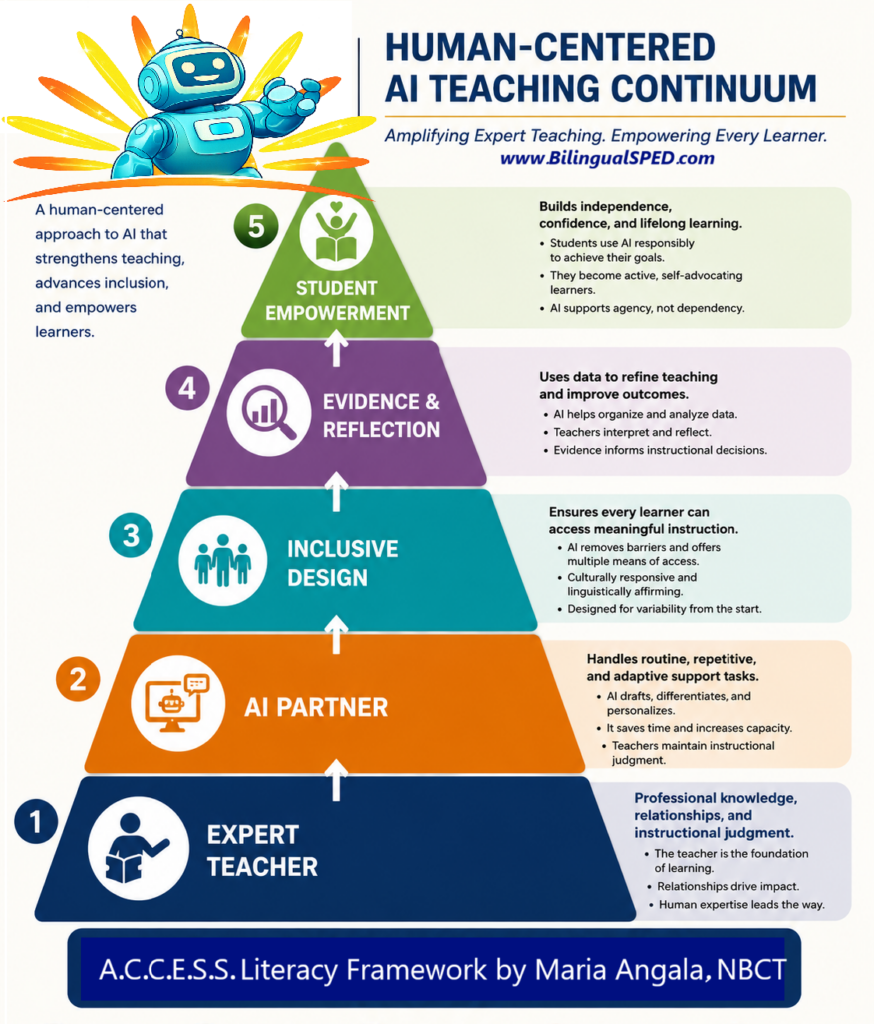
That’s much closer to the Student Empowerment end of our Human-Centered AI Teaching Continuum. AI isn’t speaking for the student. It’s helping the student develop the language, reflection, and self-advocacy needed to speak for themselves.
You are the calm in their storm. Keep showing up, keep tracking the data, and keep respecting their dignity. You’ve got this.
.
Join our FUNSHINE Community to receive our latest free A.C.C.E.S.S. AI tools and other updates: