Most AI education tools are built for the “average” learner — which means they quietly leave out students with autism, ADHD, dyslexia, and intellectual disabilities. This post breaks down why that keeps happening, what it actually costs neurodivergent kids in your classroom, and how to pick (or push for) AI tools that support executive functioning, communication, and true differentiated instruction. Written from 22+ years of bilingual special ed classroom experience, not a tech review site.
The Kid Who Broke My Favorite AI Tool
I remember the first time an AI “personalization” tool completely fell apart in my room. It was supposed to adjust reading passages to a student’s level automatically. Great in theory. Except the student I was using it with had ADHD and dyslexia, and the tool kept generating longer passages because his comprehension scores looked fine — it had no idea he was skimming, guessing, and burning through his entire executive function budget just to sit still for it.
That’s the problem in one sentence, honestly. The tool was built for a learner. Just not this learner.
And here’s the thing — that’s not a rare glitch. That’s the default. Most AI tools in education are trained on and designed around “typical” behavior patterns: steady attention, linear reading, predictable pacing. Which is insane when you think about it, because special education has never been about the typical learner. It’s the whole reason our field exists.
So let’s dig into why this keeps happening, and — more usefully — how you actually pick, adapt, or push back on AI tools so they work for your neurodivergent students instead of around them.
Why Are So Many AI Tools Built for the “Average” Learner?
Simple answer: because average is easier to code for. AI systems learn patterns from massive datasets, and massive datasets reward the most common behavior. A student with autism who processes sensory input differently, or a kid with ADHD whose attention comes in bursts, doesn’t fit the median pattern — so the tool either ignores them or, worse, flags them as an anomaly to “correct.”
This isn’t a hypothetical complaint. Researchers reviewing generative AI tools for neurodivergent learners have specifically called for stronger inclusive design practices and more sustained institutional support, because current tools still under-serve cognitive regulation, emotional support, and identity needs that matter enormously for this population.
Quick Win: When you’re evaluating any new AI tool, ask one question before anything else: “Was this designed with disabled or neurodivergent users in the room, or added as an afterthought?” You can usually tell within five minutes of using it.
What Actually Works: AI Tools Built (or Adapted) for Neurodivergent Brains
1. Executive Functioning Support
This is where I’ve seen the biggest wins, honestly, bigger than I expected going in. Tools like Goblin Tools take a big vague task — “write an essay,” “clean your desk,” whatever — and break it into small, doable steps automatically. One case example I read described a client with ADHD using it to turn “write essay” into seven micro-tasks, which cut down the stress of just starting. That’s executive functioning support, not a gimmick.
For classroom planning specifically, SchoolAI was built by educators specifically with neurodivergent learners in mind, and the data backs up why that matters — students with ADHD showed engagement scores as high as 85.3% in AI-enhanced learning environments, the strongest response of any neurodivergent group studied, largely because the systems adjust difficulty in real time instead of overwhelming or under-challenging a student.
2. Communication Support
For students who are autistic, nonspeaking, or use alternative communication, tools like VoiceItt are built specifically to recognize non-standard speech patterns — a category most mainstream voice tech straight-up ignores. And honestly? That’s the whole point of inclusive design. It’s not “does the tool work for most people.” It’s “does the tool work for this specific communication style.“
3. Dyslexia and Reading Support
Speechify reads text aloud with natural-sounding voices, which removes the decoding barrier entirely for dyslexic readers — letting them access grade-level content without the reading itself being the bottleneck. I use text-to-speech constantly with students who have strong comprehension but a decoding disability. The content was never the problem. The delivery was.
4. Sensory-Aware, Low-Friction Design
Here’s something I wish more app developers understood: neurodivergent users benefit most from tools that are flexible, intuitive, and low in sensory load — not more animations, not more notifications, not more competing visual elements. If a tool has a cluttered interface with pop-ups and sound effects, it doesn’t matter how “smart” the AI behind it is. It’s creating friction before the learning even starts.
Quick Win: Turn off every non-essential notification, animation, and sound in any new AI tool before you introduce it to your students. Less sensory noise, more actual function.
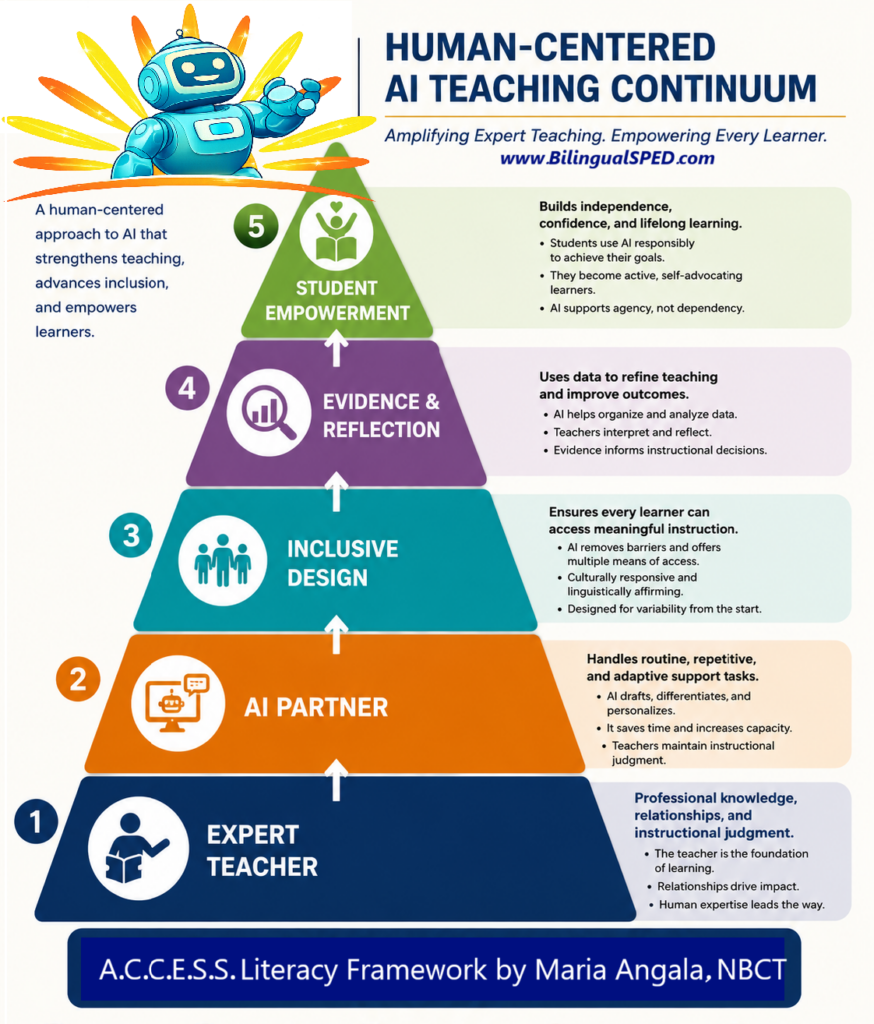
I developed a Human-Centered AI Teaching Continuum embedded within the A.C.C.E.S.S. Literacy Framework to guide educators in using AI ethically and effectively to amplify expert teaching for multilingual learners and students with disabilities.
A Lesson Where This Actually Played Out
Classroom context: A small group of students with a mix of profiles — one autistic student who needed predictable visual structure, one student with ADHD and a specific learning disability, working through a persuasive writing unit.
The instructional challenge: Getting from “I don’t know what to write” to an actual finished paragraph felt impossible for both of them, for completely different reasons. One needed a clear visual roadmap of what came next. The other could generate ideas verbally all day long but froze the second he had to organize them into a written structure.
The lesson approach: I used an AI planning tool to break the persuasive essay into small visual steps — claim, one reason, one piece of evidence, repeat — displayed as a simple graphic organizer rather than a wall of directions. For the student who processes better out loud, I let him talk through his argument into a speech-to-text tool first, then we worked together to organize the transcript into paragraphs. I also built in a short social story about “what to do when my brain feels stuck,” with a visual break card he could use without asking permission.
Student response: The autistic student, who usually needed constant reassurance about “what’s next,” worked through almost the entire graphic organizer independently — the predictability did most of the heavy lifting. The student with ADHD produced more written content in that one session than he had in the previous two weeks combined. He told me afterward, “It’s easier when I don’t have to hold it all in my head.” Which, honestly, sums up executive dysfunction better than most textbooks do.
Teacher reflection: I’ll admit I almost used the AI tool’s default long-form output, which would’ve been way too text-heavy for either of them. In my experience, the raw AI output is rarely classroom-ready as-is for neurodivergent learners — it needs a human editing pass for length, visual load, and pacing every single time.
What I’d refine next time: I’d build in a wider variety of break card options up front, not just one — sensory needs shift day to day, sometimes hour to hour, and one option isn’t enough for a whole week. I’d also translate the visual break card and social story into the home languages represented in the room, since sensory regulation language shouldn’t be limited to English-speaking families either.
The Part AI Still Can’t Do
Look, none of these tools replace you. AI can adjust a reading level or break a task into steps, but it can’t notice that a student’s stimming has changed pattern this week, or that a “meltdown” is actually sensory overload from a fire drill three periods ago. That noticing — that’s still entirely a human skill.
Researchers keep landing on the same conclusion: AI augments the teacher’s ability to reach more students, it doesn’t replace the relationship that makes intervention actually work. That tracks with everything I’ve seen in two decades of this work. The tool opens a door. You’re still the one walking the kid through it.
I built a full toolkit around exactly this gap — sensory accommodation cards, visual supports available in multiple languages, and ready-to-use social stories for exactly these moments — because most AI tools give you a rough draft, not a classroom-ready resource. If you want the ready-made version of what I’m describing here, I created a complete classroom toolkit — grab it on TpT here.
Frequently Asked Questions
Why don’t more AI tools work well for neurodivergent students?
Most AI tools are trained on data reflecting “typical” behavior patterns — steady attention, linear reading, predictable pacing — so they under-serve students whose attention, communication, or sensory processing doesn’t match that average. Inclusive design has to be intentional, not assumed.
What should teachers look for when choosing an AI tool for neurodivergent learners?
Look for tools built with input from neurodivergent users or educators specifically (not retrofitted accessibility features), low sensory load, flexible pacing, and the ability to break tasks into small visual steps. If a tool feels cluttered or overwhelming to you, it likely will to your students too.
Can AI actually help with executive functioning, or is that overhyped?
The evidence is genuinely encouraging here. Task-breakdown tools and adaptive systems have shown real engagement and performance gains for students with ADHD specifically, largely because they reduce the working-memory load of figuring out “what do I do first.”
References
- SchoolAI, “How to Use AI Tools for Neurodivergent Students” (2025)
- eSchool News, “Empowering Neurodiverse Learners with AI-Driven Solutions” (2025)
- IntechOpen, “Neurodivergent by Design: Using AI to Honor and Support Learning Differences” (2025)
- npnHub, “These 5 AI Tools Will Change How Neurodivergent People Live” (2025)
- Liao et al., “The Potential of Generative AI in Supporting Neurodiversity in Higher Education: A Systematic Review”, Wiley (2025)
Where to Go From Here
Inclusive AI design isn’t going to happen by accident. It happens because teachers like you keep asking the annoying question — “who was this actually built for?” — and keep choosing tools (or pushing developers) accordingly. That’s slow, unglamorous work. It’s also exactly the work that’s kept special education moving forward for decades, long before AI showed up.
If you’d rather not build every sensory support and social story from scratch, the complete classroom toolkit — sensory accommodation cards, multilingual visual supports, and ready-to-use social stories — is available on TpT here. Everything in it came out of real classroom trial and error, not a product roadmap.
Want more of this kind of honest, classroom-tested thinking on AI and special education — no hype, just what actually works? Sign up for my email newsletter and I’ll send new strategies straight to your inbox.
Reflection question: Think of one AI tool currently sitting in your classroom or your school’s approved list. If you looked at it through the lens of your most sensory-sensitive or most easily-overwhelmed student, would it still hold up? What’s one small tweak you could make to it this week?
You Might Also Like
More strategy and tools like this over at the BilingualSPED.com blog — including posts on the A.C.C.E.S.S. Literacy Framework, executive functioning supports for multilingual learners, and sensory-friendly classroom design.