I remember the first time I sat down with a piece of informational text about the solar system, trying to figure out how to make it meaningful for a classroom that ranged from students who were beginning to decode to those who communicated primarily through eye-gaze and touch. I had three hours: 50 minutes for English, 50 for Financial Literacy, and 50 for Digital Literacy. I spent four hours that Sunday night rewriting that one article into three different versions.
I was exhausted, and honestly? By the time Monday morning rolled around, I was too drained to bring the “magic” to the lesson.
If you’re a new teacher feeling that Sunday Night Dread, I want to coach you through a major shift. We’ve entered an era where Artificial Intelligence isn’t just a buzzword; it’s a co-planner that can help us bridge the gap for our students with significant cognitive disabilities. But there’s a catch: if you just copy and paste what a bot gives you, you lose the “soul” of your instruction.
The goal is to use AI as your “Think Tank,” not your replacement. I’ve refined this process over the years, and it’s why I developed the Core Informational Text Comprehension Skills AI-Enhanced Lessons for SPED & ELL. It’s about having the structure ready so you can spend your energy on the human connection.
1. The “Think Tank” Strategy: AI as Your Planning Partner
When you’re preparing for your “Whole Group Instruction” (the “I Do” phase), you aren’t just looking for a simpler version of a text. You’re looking for a version that respects the dignity of your learners.
The Coaching Tip: Use AI to generate the skeleton, then add the “flesh” of your expertise.
- The AI Prompt: “Rewrite this article on ‘How a Bank Works’ at a 2nd-grade reading level, but keep the vocabulary age-appropriate for a young adult.”
- The Teacher Voice: Once the AI gives you that text, you add the specific assistive technology cues. You know that one student needs a tactile button to turn the page and another needs a high-contrast screen. AI doesn’t know your kids; you do.

Use AI to generate the skeleton, then add the “flesh” of your expertise.
2. Integrating the PLUSS Framework with AI
In our Digital Literacy Academy, we don’t just “show and tell.” We use the PLUSS framework: Pre-teaching vocabulary, Language modeling, Using visuals, Strategic integration of native language, and Sustained academic talk.
AI is brilliant at generating the “V” and the “S” in PLUSS.
- Pre-teaching Vocabulary: Ask AI to “Identify the 5 most functional words in this text and create a simple, one-sentence definition for each.”
- Visuals: Use AI image generators to create specific, non-distracting images for your Level 1 learners who need a 1:1 correspondence between a word and a picture.
I Casually drop these AI-generated supports into the “Practice (We Do)” phase of my lessons. This is exactly how the Core Informational Text Comprehension Skills AI-Enhanced Lessons are structured—they give you that PLUSS-aligned foundation so you aren’t starting from a blank page at 10:00 PM.
3. Creating the “Productive Struggle” Across Three Levels
Differentiation isn’t about making things “easy.” It’s about making things accessible so the student can engage in a struggle that actually leads to learning.
Level 1: Sensory and Pictorial
For your students with significant cognitive disabilities, AI can help you find the “Big Idea.”
- Example: In a Financial Literacy lesson about “Needs vs. Wants,” AI can help you list 10 clear, high-contrast items. You then turn those into physical “sort boxes.”
Level 2: Simple Sentences and Scaffolds
These students are your “Transitional” learners. Use AI to generate “Cloze” activities (fill-in-the-blank) where the choices are visual icons instead of just words.
Level 3: Paragraphs and Metacognition
These students can handle the text but need help “thinking about their thinking.”
- The Coaching Move: Use AI to generate “Metacognitive Prompts.” Instead of asking “What is the main idea?”, ask “How did I find the answer in this sentence?”
4. Don’t Lose Your Voice: The “Metacognitive Wrap”
This is where you, the teacher, shine. After the AI has helped you level the text and create the worksheets, you need to plan your “First Five” and your “Individual Work” wrap-up.
AI can’t model the feeling of success. During the “Partner Work” (We Do) phase, you are the one circulating, using questioning strategies like, “I see you’re looking at the icon for ‘Save.’ Why did you choose that one?”
The Core Informational Text Comprehension Skills AI-Enhanced Lessons provide the text and the tasks, but you provide the encouragement that tells a student, “You’re a digital scholar. You’re ready for the workforce.”

Efficiency isn’t about being “lazy”; it’s about being an advocate who isn’t too burnt out to fight for their students.
5. Practical Implementation: The Three-Hour Block
How does this look in real time?
- 50 Min English: Use AI to modify a current event article into three levels. Use the “I Do, We Do, You Do” structure.
- 10 Min Break: Use a digital timer on the SmartBoard.
- 50 Min Financial Literacy: Use AI to generate a “Do Now” about budgeting for a specific community-based trip.
- 10 Min Break: Sensory/Movement break.
- 50 Min Digital Literacy: Using the NorthStar curriculum, use AI to create a “Cheat Sheet” of keyboard shortcuts tailored to each student’s motor abilities.
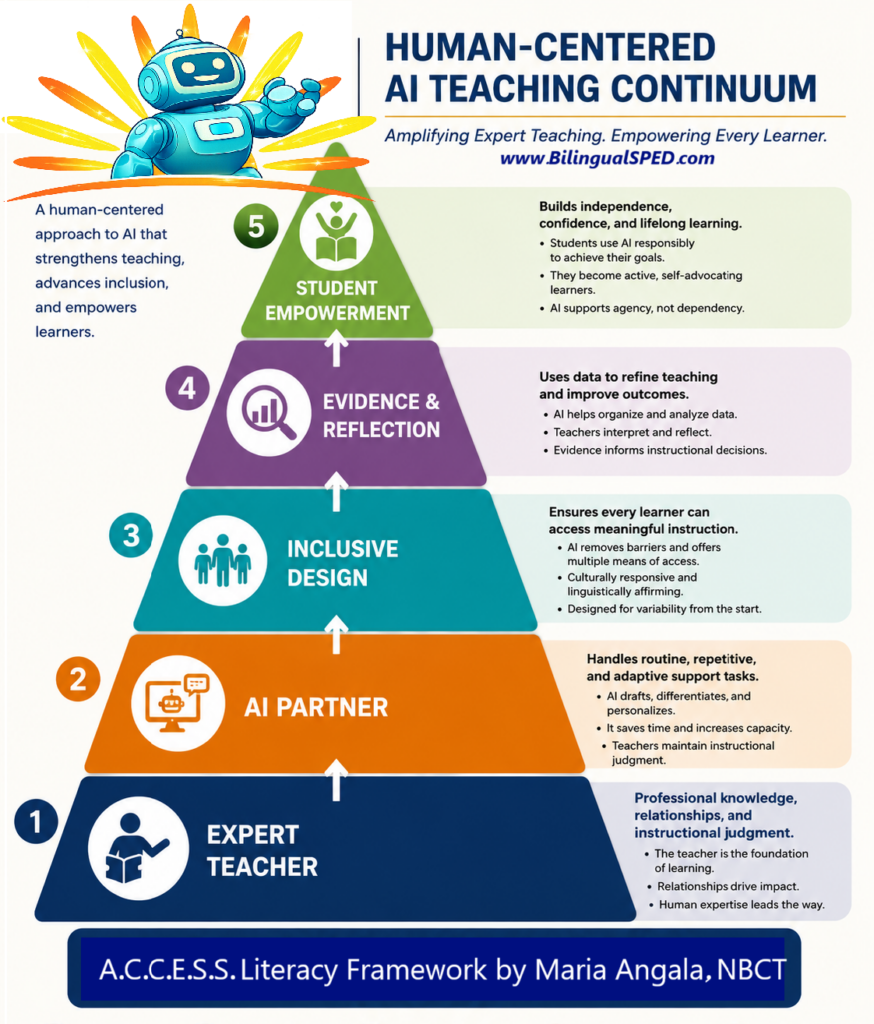
I developed a Human-Centered AI Teaching Continuum embedded within the A.C.C.E.S.S. Literacy Framework to guide educators in using AI ethically and effectively to amplify expert teaching for multilingual learners and students with disabilities.
The Ultimate Secret: Efficiency is Advocacy
Every minute you save using AI is a minute you can spend observing a student, adjusting an IEP goal, or talking to a parent. Efficiency isn’t about being “lazy”; it’s about being an advocate who isn’t too burnt out to fight for their students.
When I look at my Core Informational Text Comprehension Skills AI-Enhanced Lessons, I see hours of my life back. I see lessons that are professional, research-based, and—most importantly—accessible to the students who are too often left behind by standard curriculum.
Your Path to a “Calm” Classroom
You don’t have to choose between high-quality instruction and your own mental health. You can have both.
Your Call to Action:
- Pick one lesson next week: Use an AI tool to create three different versions of the “Do Now.”
- Level Up Your Resources: Stop spending your weekends as a ghostwriter. Grab the Core Informational Text Comprehension Skills AI-Enhanced Lessons bundle and let the technology do the heavy lifting.
- Stay Connected:
Go reclaim your voice. Your students are waiting for you, not just your paperwork.