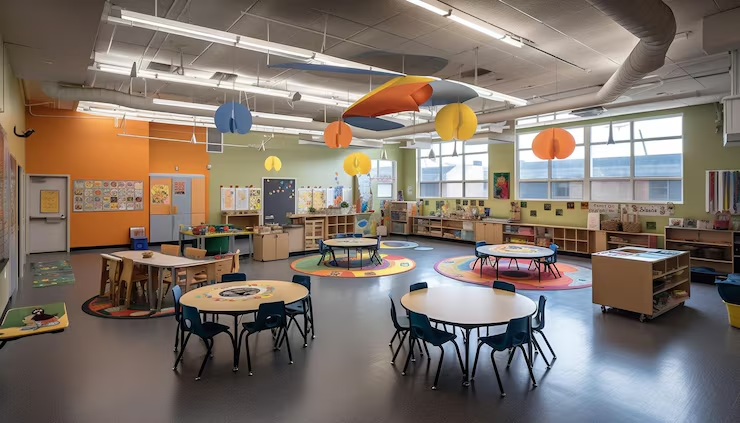
Color coding is the ultimate secret weapon for reducing cognitive load and boosting independence in the special education classroom. By assigning specific colors to subjects, students, or stations, you create a visual map that guides learners through their day with minimal verbal prompting.
I remember my first year as a digital literacy lead. I had 15 students, three different rotations, and a mountain of modified folders that all looked… exactly the same. I spent half my 50-minute English block just helping kids find their “blue” folder (which wasn’t actually blue yet). It was a disaster. Honestly, I felt like a traffic cop instead of a teacher.
If you’re a new teacher feeling that same “paperwork panic,” I’m coaching you today as someone who has been there. I’ve noticed that when everything looks the same, our students with significant cognitive disabilities or those who are new to English get “visually lost.”
I started digging into how to stay organized as a special education teacher on Edutopia, and it clicked: colors aren’t just for decoration. They are a universal language. When I finally color-coded my stations—Red for English, Green for Financial Literacy, and Blue for Digital Literacy—the “Where do I go?” questions almost vanished. It’s surprisingly effective.
How Does Color Coding Reduce Cognitive Load?
Look, here’s the thing. Our students are already working twice as hard to process language and social cues. When we give them a black-and-white worksheet or a plain gray bin, we are adding “visual noise” they don’t need.
The Science of “Signaling”
Research shows that color-coded designs are more beneficial than grayscale because they reduce overall cognitive load (Frontiers in Psychology, 2021). Colors act as a “prime” that tells the brain what to focus on.
- Red = English: The brain associates the color with the specific subject bin.
- Green = Financial Literacy: Students know green folders mean “Money Math.”
- Blue = Digital Literacy: Blue icons on the tablet match the blue tape on the computer station.
By following the tips in this Edutopia guide on organization, I started pairing my folder colors with specific subjects. It creates a “predictable world” for students who thrive on structure.
Can Color Coding Help with Station Rotations and Independence?
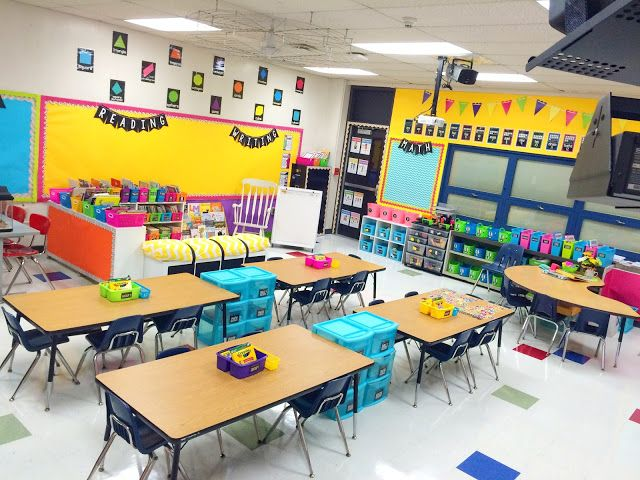
In my experience, the hardest part of a 3-hour lesson is the 10-minute break and the transitions between them. Students get distracted. They lose their “Do Now” packets. They end up at the wrong table.
The Problem: Transition Chaos
If you have Level 1 and Level 2 learners, verbal directions like “Go to the math center” can get “dropped” by the brain mid-walk.
The Solution: The “Color-Match” System
- Station Rotation: I use colored tape on the floor and matching colored signs at each station.
- Visual Schedules: Each student has a personal schedule where the “English” icon is backed with red paper. When it’s time for English, they just find the “Red Table.”
- Work Systems: I use the Choiceworks app to create digital visual schedules that use matching colors for each task.
Quick Win: Put a piece of colored duct tape on the corner of every student’s desk that matches their “Home Base” bin. If they find a stray pencil, they just look for the matching color!
Why Is Color Coding Essential for ELL and SPED Learners?
If you are a teacher at a Digital Literacy Academy like me, you probably have students who are still acquiring English. For them, a sign that says “Station 1” is a bunch of abstract squiggles. But a big Yellow Square? Everyone knows what a yellow square is.
In my experience, using color-coded visual supports in multiple languages is a game changer for inclusion. I use Canva to create bilingual labels (English/Spanish) where the background color stays consistent. This way, the student learns the concept of the station before they even master the word.
I’ve noticed that even the Edutopia article on teacher organization mentions using QR codes and color-coded file folders to keep everything straight. It’s about creating a “visual bridge” for the student.
How to Set Up a Color-Coded “Workforce Ready” System
Since we are preparing our students for certificate courses and the workforce, we need our systems to be professional but accessible.
1. The Subject Rotation
Assign one color to each of your 50-minute blocks.
- English: Red (Folders, Bins, Icons)
- Financial Literacy: Green (Money Mats, Calculators, Worksheets)
- Digital Literacy: Blue (Headphones, Login Cards, Mousepads)
2. The Student “Identity” Color

For students with significant cognitive disabilities, give them a “Signature Color.” If “Student A” is the “Yellow Student,” their chair, their communication book, and their data binder are all yellow. This maintains confidentiality and helps staff find their materials instantly.
I actually use the templates from my Color Coded Station Rotation & Work System Setup Guide to make sure my whole team is on the same page. When everyone knows that “Yellow” belongs to one specific student, nobody “accidentally” looks at their private medical forms.
Dealing with the “Productive Struggle” and Metacognition
We want our students to engage in a bit of “productive struggle.” If I always hand them the red folder, they aren’t learning. But if I say, “It’s time for English. Which folder do you need?” and they have to visually scan and pick the red one? That’s metacognition. They are thinking about their own learning process.
Personal Observation: Sometimes I’ll purposefully put a blue worksheet in a red folder to see if they notice the “error.” It’s a great way to check for comprehension without a formal test!
Final Thoughts: Start Small, Think Big
New teacher, don’t try to paint your whole room by Monday. Start with one subject. Pick your hardest transition and color-code just that one.
As the Edutopia guide to staying organized says, a little bit of weekly upkeep makes a huge difference. Color coding isn’t just a “cute” classroom trend; it’s a functional accommodation that gives our students the independence they deserve. Plus, it makes your classroom look like a well-oiled machine, which is a nice bonus for those admin walkthroughs!
Ready to Color Code Your Success?
The “Visual Map” is the most powerful tool in your kit.
Your Action Plan:
- The “Rainbow” Audit: Pick three colors and assign them to your 50-minute blocks tonight.
- Grab the Gear: Get some colored duct tape or markers to start marking your bins.
- Join the Think-Tank:
Reflection Question: Look at your classroom right now. If a student who couldn’t read walked in, would they know where to go for English vs. Financial Literacy? What’s one visual “signpost” you can add tomorrow?